CAD Floor Plans in Layered DWG ready for space planning
CAD floor plans your team can open and keep working in: named layers, associative dimensions, nothing on layer 0. We calibrate scale to two laser-measured dimensions and save the file in your AutoCAD version.
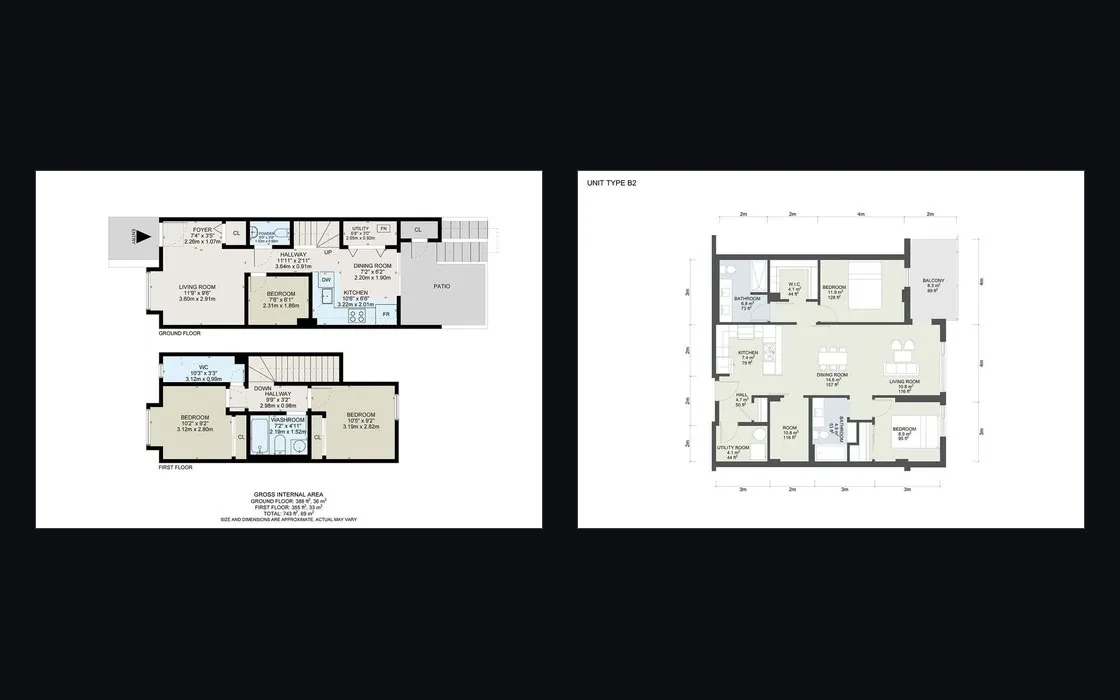
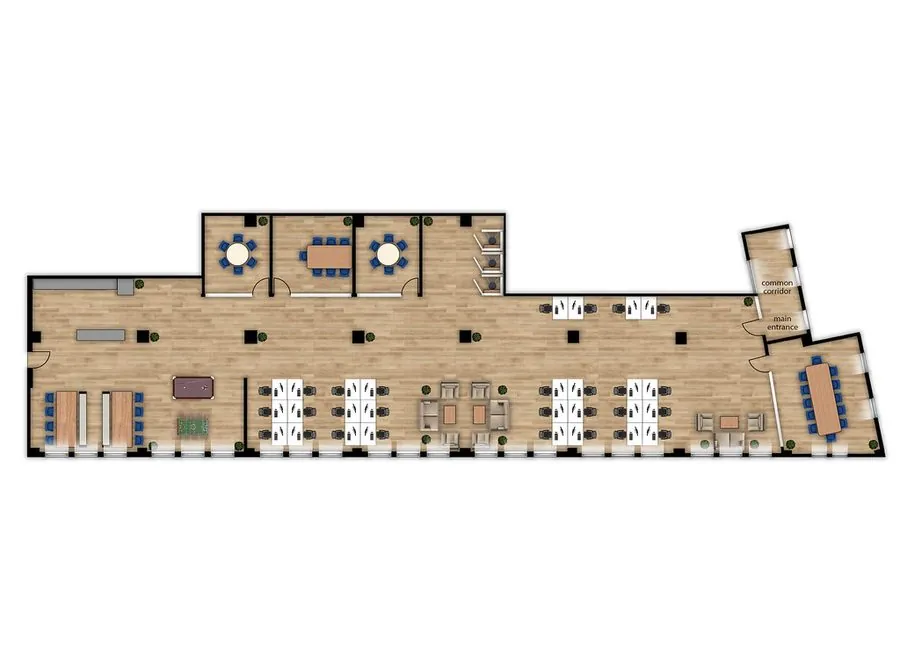
CAD floor plans that open clean
A plan can look right on screen and still be a mess inside: exploded dimensions, everything on layer 0, a version nobody can open. Ours are drafted to be worked in.
Layered DWG
Layers follow your company standard, or the AIA CAD Layer Guidelines and US National CAD Standard, such as A-WALL-FULL.
Associative dimensions
Dimensions stay linked to the geometry, so moving a wall updates the number.
Scaled PDF
Title block, scale bar and print scale, with the intended use printed in the title block.
Complete plan content
Walls, doors, windows, columns and fixed fixtures, ready for furniture and seating layouts.
Area schedule from geometry
Optional: rooms drawn as closed polylines, with the area table pulled from the geometry instead of typed.
Purged, audited, your version
Every file is purged and audited, then saved in the AutoCAD version you work in.
For teams that plan space in DWG
Architects and interior designers
Start furniture layouts and design options on a clean, layered base.
Workplace and space planners
Draw seating plans and floor plan options on a drawing whose scale has been checked.
Commercial leasing teams
Produce layout options and leasing material from one consistent DWG base.
Facility and property managers
Keep an editable record of each floor for moves, seating changes and furniture planning.
From laser measurements to a working DWG
A standard project is delivered in 2 working days; a typical residential set takes 3–5 working days.
Order and upload
Send your source material with at least two laser-measured overall dimensions, ceiling height, floor levels, units, print scale and your DWG template if you have one.
Calibrate the scale
Scale is set from your two overall dimensions. A deviation above 2% is reported to you before delivery.
Draft to standard
Every element goes on a named layer with associative dimensions, then the file is purged and audited.
Review and refine
You get the DWG and the scaled PDF, with two revision rounds to use within 14 days.
Your price on the form, before you commit
Enter your project details on the order form and the price appears straight away, in USD.
Included
- Layered DWG in your AutoCAD version
- Scaled PDF with title block and scale bar
- Walls, doors, windows, columns and fixed fixtures
- Scale check against two laser-measured dimensions
- Two revision rounds within 14 days
What affects the price
- The scope you enter on the order form
- The optional area schedule from room polylines
- Scope changes after approval, quoted as a new order
If our drafters find the price needs to change after reviewing your files, you hear within 12 working hours and decide: take the new price, trim the scope, or cancel for a full refund.
Drafted to be worked in, not just looked at
- Standards you can auditNamed layers, nothing on layer 0, associative dimensions, purge and audit. Open the file and check it yourself.
- Honest about toleranceAbout 1–2%, with the intended use in the title block. If you need construction accuracy, we tell you rather than sell the wrong drawing.
- Your template, your versionSend your DWG template and layer conventions; we follow them and save to the AutoCAD version your office runs.
CAD floor plan questions
How much do CAD floor plans cost?
The order form prices your project as you enter the details, and you pay at that step by card.
What file formats do your CAD floor plans come in?
A layered DWG saved in your AutoCAD version, plus a scaled PDF with title block and scale bar.
How accurate are the drawings?
Tolerance is about 1–2%. Scale is calibrated to two laser-measured overall dimensions, and any deviation above 2% is reported before delivery.
Can I use these DWG floor plans for construction?
No. They are made for furniture layouts, seating plans, floor plan options and leasing material, and the scope of use is printed in the title block.
Which layer standard do you follow?
Yours, if you send a template. Otherwise the AIA CAD Layer Guidelines and US National CAD Standard, with names such as A-WALL-FULL.
How long does a CAD floor plan take?
Two working days for a standard project. A typical residential set takes 3–5 working days.
How many revision rounds do I get?
Two, to be used within 14 days. Each round is one consolidated set of comments.
Get CAD floor plans your team can keep working in
Fill in the order form, see the price, and receive layered DWG plus PDF in 2 working days for a standard project.
- Saved in your AutoCAD version
- Scale checked against laser measurements
- Revisions within 14 days
Your situation
- You receive a DWG from somewhere. Layers are named arbitrarily, room boundaries are not closed, areas have to be remeasured by hand. Half a morning goes before the real work begins.
- For workplace planning, interior schemes or leasing documentation, you do not need construction-drawing precision. You need a base drawing that works straight away.
What we do
- We deliver a DWG layered to your firm's standard, room boundaries drawn as closed polylines, and an area schedule extracted directly from the geometry.
How we do it
- Drawings are produced in AutoCAD using your firm's layer standard, or the AIA and NCS conventions where no internal standard exists.
- Areas are extracted from closed polylines rather than keyed in, which eliminates transcription error entirely.
- Scale is calibrated against 2 laser-measured overall dimensions. Quality control validates polyline closure, reconciles the area schedule against the geometry, and compares overall dimensions to the reference measurements. Deviation beyond 2% is reported before delivery.
Evidence
- Scope of use is printed in the title block of every sheet.
- Where your intended use demands construction tolerance, we do not issue this drawing and redirect you to our Construction-Grade As-Built Drawings service — even where that changes the size of the engagement.
- The area schedule and the geometry always agree, because they come from the same source.
What you need to send
- Source material: sketches, a survey, a scan, or an existing set to redraw
- Your CAD standard — layer names, text styles, title block, plot style table
- Sheet list: which plans, elevations, sections and details you need
- Units and the AutoCAD version you work in
How it runs
- Place the order with the source files, your CAD standard and the sheet list.
- We open the files and confirm the estimate inside one business day.
- We draft or model to the agreed standard and level of development.
- You review. Two revision rounds are included.
- We purge, audit and deliver in your software version, with PDFs.
- Layered DWG to your specified standard
- Scaled PDF with title block and scale bar
- Complete plan showing walls, doors, windows, columns and fixed equipment
- Area schedule by room and in total (paid option)
How to order
- Complete the project form. The price appears immediately and you pay at that step.
- Declare the intended use of the drawing. This is a required field.
- We review the data and notify you within 12 working hours if the price changes.
- You receive the completed DWG.
What to prepare
- At least 2 overall laser-measured dimensions
- Ceiling heights and floor levels
- Units of measure and required plot scale
- Your firm's DWG template and layer convention, if available
Using the files
- Use for interior layouts, seating plans, floor-plate schemes and leasing marketing material
- Area figures are preliminary — suitable for comparison and planning
- Not to be relied on for lease contracts, permitting or construction
Turnaround
- 2 working days for a standard project. Actual turnaround depends on the individual project and is calculated once you have completed the form. Unusually large or complex projects are scheduled separately, or we contact you to clarify.
Revisions and scope changes
- Revisions: 2 rounds included within 14 days.
- Changes of scope — revised layout, revised style, or revised requirements after approval — are quoted separately as a new order. We always advise before proceeding, with no unexpected charges.
Payment
- You complete the project form, the price appears on screen, and you pay at that step. We do not produce first and invoice afterwards.
- Once the order is received we review the data and actual scope. If the price needs adjusting you are notified within 12 working hours and have 3 options: accept the revised price, reduce scope to match what you have already paid, or take a 100% refund and cancel.
- Payment is by Visa, Mastercard or American Express through the OnePay gateway. Prices are quoted in USD and exclude payment processing fees.
- Clients with usage of USD 3,000 and above may pay on account. We issue the invoice on the last day of the month, payable within 10 days.
Refunds and cancellation
- Before we begin, or where you do not accept a revised price at the confirmation step: 100% refund.
- Started but no first draft delivered: 70% refund.
- First draft delivered: 30% cash refund.
- Final files delivered: no refund. Remedy is free technical correction under this service's policy.
Where the fault is ours
- Work outside the scope agreed in the order: we redo it in full at no charge, and it does not count against your revision rounds.
- Deviation beyond the tolerance declared for this service: we redo it. If you no longer require the work, 100% refund.
- Delivery more than 72 hours past the committed schedule without prior notice, excluding non-working days and measured in Vietnam time: you choose either a 20% reduction or cancellation with a 100% refund.
- Delay caused by incomplete or incorrect data on your side, by slow response at an approval step, or by mid-project change requests, does not fall under the cases above.
Quality claims
- Submit a claim within 7 working days of handover, identifying the specific item and location at issue.
- We reconcile the work against the agreed scope and against the source data you supplied, and issue a conclusion with supporting evidence within 5 working days.
- Where the claim is substantiated we redo the work at no charge or refund under the Lesmee fault clause. Where it is not, we explain the position and propose a chargeable revision.
Order closure and data retention
- Deemed closure: if we receive no response within 30 working days of handover, the order is treated as complete and closed automatically.
- Project data retention: a maximum of 12 months from the date the order is completed. Beyond that period all project data is deleted and cannot be recovered by any means.
Rights
- Commercial usage rights transfer on payment in full.
Scope of use and limitations
- Scope of use printed in the title block of every sheet: derived from commercial-grade scan data at approximately 1–2% tolerance; not for construction, fabrication, permitting, appraisal or legal purposes.
- All overall dimensions are reconciled against the laser measurements you supply. Deviation beyond 2% is reported before delivery.
- Where construction accuracy is required we do not issue this drawing and recommend the Construction-Grade As-Built Drawings service.
- Lesmee accepts no responsibility for loss arising from use of the drawing outside the stated scope.
Confidentiality
- We execute a non-disclosure agreement with every corporate client.
- Your project does not appear in the Lesmee portfolio without written consent, and is never shared with any third party.
- Sensitive data is not stored on public cloud services.
Where we may decline
- Requests for formats outside the standard delivery set without prior declaration at the time of ordering.
- Changes to the input information of an order already completed, or currently in production.
- Requests beyond the scope of the original order.
- Requests to use the deliverable for construction or engineering design where this service is not supplied for that purpose. In such cases we direct you to the appropriate service rather than issuing work for the wrong use.
- Requests to recover data from an order past the 12-month retention period. The data has been deleted and cannot be recovered by any means.
- Supplying data or part of a project you do not own or have no right to use.
- Work containing content prohibited under Vietnamese law.
Pricing
- Priced by the size of the surveyed space.
- The exact figure appears on the order form as soon as you have provided the required project information.
Sign in, then right back here